How to Upgrade to a Smart Thermostat and Add a New Wire
Smart thermostat upgrades get complicated when the new thermostat needs more connections than the existing cable can support. In older homes and finished spaces, pulling new wire can mean opening walls, extending labor time, and increasing installation cost.
This guide walks through how to evaluate your wiring, how to add a new wire, and how to use a smart-wire module.
To do that, you work in order:
- Confirm what you have and what the new thermostat needs
- Consider a universal thermostat smart-wire module
- Understand what a smart-wire module does and where it goes
- Run a few compatibility checks so you don’t create unexpected operation
- Install in a way that stays serviceable and reliable
Confirm what you have and what the new thermostat needs
Before you try to install a smart thermostat without running new cable, do one basic check first: do you have enough wires to support what the new thermostat needs?
Step 1: Count the wires at the thermostat
Start at the thermostat. Remove it from the wall and count the wires in the cable. Then note what each wire is connected to on the old thermostat. Wire colors are helpful when they’re correct, but they’re not always reliable. What matters more is the terminal letter each wire landed on. That gives you a clear baseline of what the system is using today.
Step 2: Identify the equipment type
Next, identify the equipment type, because the equipment determines which thermostat connections are actually required. A basic furnace and air conditioner setup usually needs fewer connections than:
- a heat pump
- a system with multiple heating or cooling stages
- a system with add-ons like a whole-home humidifier or ventilation control.
The more features the equipment has, the more control points the thermostat may need.
Step 3: Compare current wiring to thermostat requirements
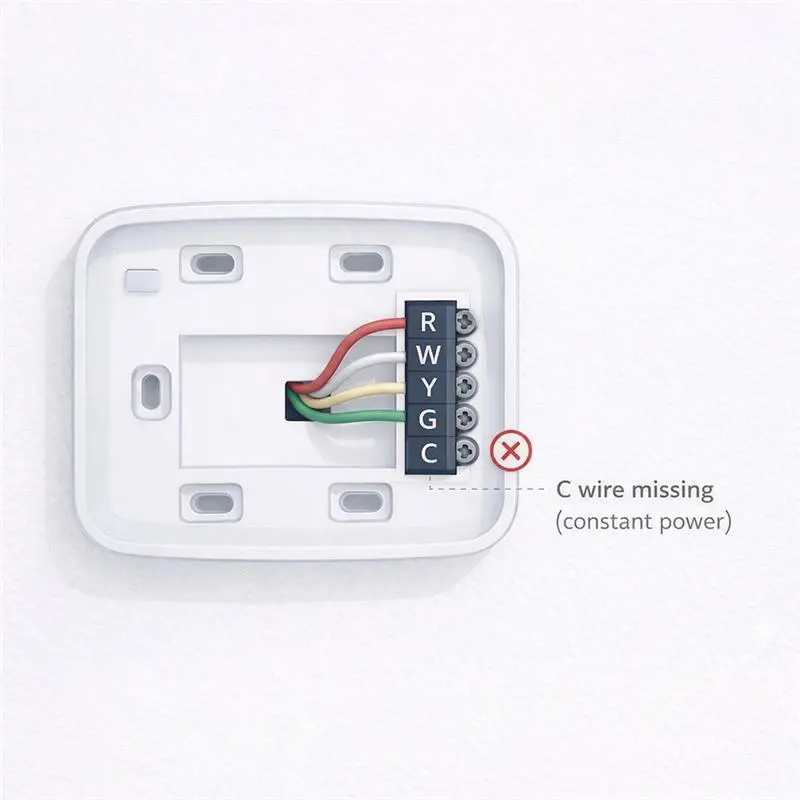
Now look for the most common mismatch on retrofit applications. Many older thermostats ran fine on four wires—power, heat, cooling, and fan—often labeled R, W, Y, G. Many smart thermostats also want a C wire, which is a steady return path for power so the thermostat can stay powered all the time. Depending on the system, the thermostat may also need additional terminals for things like a heat pump reversing valve (O/B), backup heat (AUX), or added stages.
Once you’ve confirmed what wires are available and what the new thermostat requires, you can choose a smart retrofit path up front rather than discovering halfway through the installation that you’re short a wire.
A smart-wire module: the least invasive fix
If you don’t have enough wires for a smart thermostat, the goal is to solve the problem without turning the job into a construction project. In many retrofit applications, the best option is a smart-wire interface that preserves function without requiring additional cable pulls.
When a smart-wire module makes sense
One practical example is the UT-SWM Universal Thermostat Smart Wire Module. The UT-SWM is a low-cost solution for applications where you need to control as many as seven outputs across a single pair of wires between the thermostat and the indoor AHU. No need to open drywall and run long cables.
It also supports both heat pump and conventional HVAC systems, and is compatible with nearly all major thermostat brands.
A smart-wire module can turn a wiring limitation into a simple upgrade.If you’re using a smart-wire module, here is how to understand what it’s doing and where it should live.
Where the smart-wire module goes and what it does
A smart-wire module sits between the thermostat and the equipment so you can support smart thermostat control with fewer conductors than a traditional setup might require.
How the UT-SWM is set up
With the UT-SWM, the installation includes a compact sender module and a relay receiver module. One side is installed near the indoor equipment, where it can access the control terminals and power. The other side is installed at the thermostat location, allowing the system to use the existing wire path more efficiently.

How it creates the connections a smart thermostat needs
The module helps you get the control functions you need without pulling a completely new cable run.
You would simply connect two of the existing wires from the equipment to the sender module, which turns into seven outputs or wires that you can then use at the thermostat. You now have enough connections for the new c-wire the smart thermostat needs.
What the module is doing behind the scenes
The module handles some of the switching work that extra conductors would normally do. That allows the thermostat to stay powered and control the system using the limited wiring already in place.
The next step is making sure the module, the system, and thermostat are actually compatible.
Compatibility checks
Before you commit to a wire-saving module, run a few quick compatibility checks.
Confirm the module fits the system type
A basic furnace and air conditioner setup is usually straightforward. Heat pumps and systems with multiple stages can require more control connections. The module has to support those extra functions, or you may end up with missing features or incorrect operation.
For retrofit applications, it’s especially important to confirm that the chosen interface supports the specific system type, including conventional and heat pump applications.
Confirm the control power is solid
These systems run on 24-volt control power. Verify you have steady 24V available at the equipment and that the transformer has enough capacity to power the thermostat plus the added module. If the transformer is already near its limit, adding another device can create low-voltage problems that show up as intermittent issues such as relays chattering or the thermostat rebooting.
Confirm thermostat compatibility
Not every smart thermostat works well with every smart-wire interface. Some thermostats expect to see certain connections directly, and some interfaces are designed around specific thermostat behaviors. The safe approach is to confirm that the thermostat and the module are intended to work together before installing.
When comparing smart-wire options, verify support for both conventional and heat pump systems and confirm compatibility with the thermostat brand being installed. The UT-SWM is designed to support both and is compatible with nearly all major thermostat brands.
Compatibility Rule:
- match the module to the system type
- confirm you have enough 24V power capacity
- verify the thermostat is compatible with that specific interface
If the compatibility looks good, the final step is installing in a way that stays easy to understand later and reliable in the field.
Installation best practices for smart thermostat upgrades
Retrofit thermostat jobs succeed when the wiring is clear, the module is mounted properly, and the connections are solid. Most failures come from confusion during the swap or from a weak connection that shows up later.
Label before you move wires
Before changing anything, take a quick photo and label what each wire was doing on the old thermostat. Then map that to what you’re connecting on the new thermostat or the smart-wire module. This prevents misidentifying a wire mid-install and chasing strange behavior afterward.
Mount the equipment-side module in a clean, serviceable spot
Mount the equipment-side module where it can be reached later without disassembling the unit, and where it won’t be bumped, pulled, or exposed to heat or moving parts. Avoid letting it hang by wires. A neat mount is not just cosmetic. It reduces wear and makes future troubleshooting faster.
Make terminations solid
Retrofit applications fail more often from loose splices, weak terminal screws, and messy wire ends than from a bad module. Make sure wire ends are clean, fully seated, and tightened correctly. If you’re using connectors, use the right size and confirm they are secure. After everything is connected, give each wire a gentle tug and re-check tightness.
A reliable installation comes down to three habits:
- label first
- mount cleanly
- make connections solid
Conclusion
If the main obstacle is limited wiring, damaged cable, or a system needs a full rewire, a smart-wire module may be the simplest path to a smart thermostat upgrade.
For many retrofit applications, the goal is not just to make the thermostat work. It’s to preserve system function, avoid unnecessary wall repair, and keep the installation predictable. That’s where a solution like the UT-SWM Universal Thermostat Smart Wire Module make sense. Reduce installation costs by avoiding additional wire pulls while supporting both conventional and heat pump systems.